Sunday, October 19, 2008

Publish Orchestration as web Service Problem

Issue# 6
Error: after publishing the orchestration ports as a web service, the result from the orchestration should be multiple records, but the web service return only the first record.


Cause: because the schema of the response port missing the “minOccurs="1" and maxOccurs=”unbounded””, to tell the web service generator that the data returned from this operation will be multiple records (array).

Resolution: set these properties in the final result schema.

Created by
Ahmed Abdel Moneim

Submit Message to BAS Problem

"You receive a "Destination party not found" error message when you try to run the scenario in module 3 of the "Partner Management and Business Activity Monitoring" tutorial in BizTalk Server 2004
View products that this article applies to.
Article ID : 896311
Last Review : September 24, 2007
Revision : 2.4
SYMPTOMS
In Microsoft BizTalk Server 2004, when you try to run the scenario in module 3 of the "Partner Management and Business Activity Monitoring" tutorial, you receive the following error message:
OrderProcess.OrderService(65270963-3dea-9fe0-fcd4-20547da7368e), instance 0c36eaf3-94e2-4198-8809-3a1225eeef74 Destination party not found while attempting to send message 'MinPOAmountRequestMsg' to (s-1-5-7, OrganizationName).

Exception type: DestinationPartyNotFoundException

Exception from HRESULT: 0xC0C01665.
"


Cause:
This issue occurs when the Logon property of the BizTalkServerIsolatedHost host is set to \UserAccount instead of LocalComputerName\UserAccount. BizTalkServerIsolatedHost is the default isolated BizTalk Server host.

This issue may occur when you run the BizTalk Server 2004 Configuration Wizard to set up BizTalk Server 2004 to run on a single computer. By default, when you run the Configuration Wizard, the Configuration Wizard creates the appropriate BizTalk Server group accounts for you. However, the Configuration Wizard may incorrectly set the Logon property of the BizTalk Server host to \UserAccount instead of LocalComputerName\UserAccount.

Note The Logon property of the host may also be set to a valid domain account. For example, the Logon property may be set to DomainName\UserAccount.
Back to the top

RESOLUTION:
To resolve this issue, you must set the Logon property of the BizTalkServerIsolatedHost host to LocalComputerName\UserAccount. To do this, follow these steps: 1. Click Start, click All Programs, click Microsoft BizTalk Server 2004, and then click BizTalk Server Administration.
2. In the BizTalk Server Administration Console, expand Microsoft BizTalk Server 2004 (local), expand Hosts, and then click BizTalkServerIsolatedHost.
3. In the result pane, right-click your local computer name, and then click Properties.
4. In the Properties dialog box, click Change.
5. In the Provide account information dialog box, type LocalComputerName\UserAccount in the Logon box.

Note Replace LocalComputerName with your local computer name and replace UserAccount with your local user account name.
6. In the Password box, type your local user account password, and then click OK two times.
Note After you set the Logon property to the correct local user account name, you must restart the BizTalk Server service.

Also Applies to 2006

Created by
Ahmed Abdel Moneim - I found it on Microsoft sub site.

Configure BAS in BizTalk 2006


Issue #4
Problem: when trying to register BizTalk server to the BAS to associate the BizTalk Management database with the BAS Web site and create a receive location for the BAS outbox, it gave me the below error:
"Failed to create the BizTalk registration for the BizTalk Server named, 'D0E6D8987F4E458'.
Could not store transport type data for Primary Transport of Send Port 'Bas.TpmWebServicePort' to config store. Primary SSO Server 'D0E6D8987F4E458' failed. Cannot perform encryption or decryption because the secret is not available from the master secret server. See the event log (on computer 'D0E6D8987F4E458') for related errors."


Reason: After reinstalling BTS 2006, I connect the SSO to the existing DB and SSO create new secret file, so the SSO refer to secret file not exist.


Resolution:
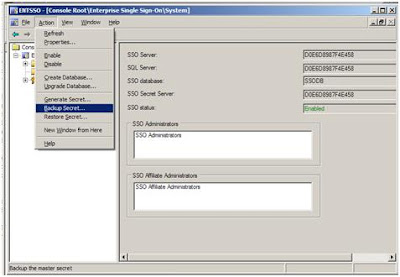
1. BizTalk backup the secret file in this path: “C:\Program Files\Common Files\Enterprise Single Sign-On”. With file extension .bak
2. Open SSO Administration console, exist in the same path ”C:\Program Files\Common Files\Enterprise Single Sign-On\ ENTSSO.msc”
3. Choose “System” from the right Pane.
4. From menu choose ActionsèRestore Secret.


5. Then browse for the key backup and type the password:
Example for the password “The SSO backup file password is the current password of Administrator as of Wed, 10 Sep 2008 12:48:25 GMT appended to Administrator. For example, Domain\UsernamePassword.”
If it installed by local account it will be “UsernamePassword” only.


Created by
Ahmed Abdel Moneim


Configuring WSS 2.0 SP 2.0 to work with BizTalk 2006


Issue #3


Problem: After installing the WSS 2.0, it gave the below error when trying to save the configuration in the SharePoint administration page:
“System Error 1057 while trying to query service "SPTimer"”


Reason: because the Identity of the SharePoint Application Pool configured as below


Resolution: set the identity with the format “Machine Name OR Domain Name\User Name”


Created by
Ahmed Abdel Moneim


Installing WSS 2.0 SP 2.0 to work with BizTalk 2006

Issue #2
Problem: When completing the Labs, I installed the WSS 2.0 with Service Pack 2.0 with default options, but when I read the installation guide I discovered that I should select “Farm” WSS 2.0 with Service Pack 2.0 with default options, but when I read the installation guide I discovered that I should select “Server Farm” under “Type of Installation”, I uninstalled it, then I try to installed it again, but the I didn’t see “Type of Installation” window again.


Reason: because when installing WSS 2.0 it creates MSDE instance and it create DB that stores all the options you select.

Resolution: Uninstall it from Add\Remove Programs “Microsoft SQL Server Database Engine (SharePoint).

Created by
Ahmed Abdel Moneim

Rule Engine Service Configuration Problem

Issue #1:

Problem: When Uninstalling BizTalk server 2006 and try to configure the rule engine, it gave the below error :

"Port 3132, which is required by the Rule Engine Update Service, is being used by another application, Restart this computer and rerun configuration."


Reason: after I install windows share point services 3.0, the “SharePoint Central Administration” site use it.


Resolution:Change the port in IIS manager.


Created byAhmed Abdel Moneim

Wednesday, April 11, 2007

ASP.Net Quick Tips - State Management

February 28

ASP.Net Quick Tips
- State Management


Sursa


The web is inheritently stateless, however, ASP.Net provides you with a very
comprehensive list of options to overcome this lack of statelessness. Using them
effectively is a critical of a successful ASP.Net application.


Tip: Do not use the Application statebag.


Cache does everything you can do with Application. Application was created to
smooth the transition of ASP.Old users to ASP.Net. There is no reason to use
Application and it should be avoided.


Tip: Use a safe pattern for accessing objects from a
statebag
.


All statebags take the form of a key/value dictionary. While they are very
easy to work with, if you are not careful you can introduce subtle issues and
potentially open yourself up to a hard to debug exceptions.


The ideal pattern takes the form of:

MyObject obj = StateBag["key"] as MyObject;
if(obj == null)
{
//Do Something here

}


Using this pattern helps to avoid multiple lookups, race conditions, and
invalid cast exceptions. The most common abuse of this rule looks like this:

MyObject obj = null;
if(StateBag["key"] != null)
{
obj = (MyObject)StateBag["key"];
}


In the bad example above, we look up the key twice, introduce a possible race
condition (what if in-between the key look up and request it is removed), and
have a possible invalid cast if the type of object stored by "key" is not of the
type "MyObject" (or a derivative/etc).


Tip: Understand the importance of HttpContext.Items.


The HttpContext provides a per request statebag you can use to store objects
that are only needed on the current request. As I have mentioned before it
is advisable to avoid Session when possible. However, there are likely objects
which are re-used through the course of a request and HttpContext.Items is an
idea place for them. The first time I ever heard of the HttpContext.Items was in
an article "A Matter of
Context
" by the great Susan Warren.


Tip: Do not overlook Cookies and Hidden fields.


As I have mentioned a couple times by now, I generally recommend avoiding
Session. But there are quite a few times when you need to store values between
requests and Cache/Database/etc just do not make sense. Cookies are an excellent
candidate to temporary information which needs to exist across multiple pages
and hidden fields can be used as a way of quickly tucking away values on a per
page basis.


Tip: Know what is in your cookies and ViewState.


Both cookies and viewstate provide excellent ways to store data, but you must
always keep in mind that this data will travel to and from the server on every
request. Keep it small and simple.


Tip: Do not store secure/secret data in Cookies, Hidden fields, or
ViewState.


If you do not want users reading data, tampering with data, etc then do not
push it down the client and store it on their machines. This is the equivalent
of a putting something shiny and red in front of a baby and then saying do not
touch.


Tip: Consider using a Ticket for more safely obscuring data in a
cookie on the client.


As the tip above states, you should not put secure data on the client.
However, there times you may want to store data on the client via a cookie and
do not want them to be able to tamper with it. ASP.Net ships with an API/object
called FormsAuthenticationTicket which is used to safely manage your Forms
authentication cookie. You can leverage this API and store your own information
in a cookie on the client.


To do so, simply create a new FormsAuthenticationTicket
, pass it a few settings, and your "secret data". From there you call
FormsAuthenticationTicket.Encrypt which returns a string you can store in a
cookie. Here is quick example:

string secretData = "secret";
DateTime dt = DateTime.Now;
FormsAuthenticationTicket newTicket =
new FormsAuthenticationTicket(1, "ticketName", dt,

dt.AddDays(7), true, secretData);

HttpCookie newUserCookie = new HttpCookie("theCookie");
newUserCookie.Value = FormsAuthentication.Encrypt(newTicket);
newUserCookie.Expires.AddDays(7);


Response.Cookies.Add(newUserCookie);


To re-use the data, simply fetch the cookie and call the
FormsAuthentication.Decrypt method:

HttpCookie userCookie = Request.Cookies["theCookie"];
string secretData = null;
if(userCookie != null)

{
FormsAuthenticationTicket ticket =
FormsAuthentication.Decrypt(userCookie.Value);
secretData = ticket.UserData;
}


Tip: For custom ASP.Net server controls, if you need to make sure a
value is persistent, use Control State and not ViewState.


As stated previously, I generally recommend disabling ViewState. As a control
developer, this can cause problems since there maybe times when using something
like ViewState is necessary for your control to function properly. Thankfully in
ASP.Net 2.0, as a developer, you now have a new option, Control
State.


Fritz Onion has a great detailed
explanation of Control State
:


Control state is essentially another state repository whose contents is
propagated much like view state, but the purpose of the control state
repository is to cache data necessary for a control to properly function. To
put it another way, behavioral state for a control should be kept in control
state, and UI state (its contents) should be kept in view state. Thus in the
new GridView class, you can completely disable view state, and the pagination
and editing events still fire as expected.


As always, I am eager to hear your feedback, additions, and suggestions. I am
working on a separate post with tips on the most important state management
option, caching, which is why I avoided the topic here.


FYI, this is part three of a continuing series of ASP.Net Tips. If you
found this post helpful, you may want to check out the other posts in the
series: General
ASP.Net Tips